
In today’s digital world, your Aadhaar card is linked to many essential services, including mobile connections. Most people are surprised to learn that multiple SIM cards can be issued using one Aadhaar number. Sometimes, unused or unknown numbers remain active without your knowledge. Therefore, knowing how to check how many SIMs on Aadhaar card is not just useful, but also important for personal security.
Many people face issues like OTP fraud, spam calls, or even legal trouble because a SIM registered in their name is misused. However, the good news is that the Indian government has made it easy to check and manage all mobile numbers linked to Aadhaar. Let’s understand this step by step in a simple and practical way.
Table of Contents
ToggleWhy You Should Check SIM Cards Linked to Your Aadhaar
Prevent misuse of your identity
Mobile numbers are often used for banking, social media, and official verification. If an unknown SIM is active on your Aadhaar, it can be misused for illegal activities. As a result, you may face unnecessary trouble even if you are not involved. Checking linked SIMs helps you stay safe.
Avoid financial and legal risks
Many fraud cases start with a SIM card registered using someone else’s Aadhaar. For example, a fraudster may open wallets or take loans using OTPs sent to that number. Therefore, verifying the number of SIM cards linked to Aadhaar is a smart preventive step.
Keep your digital records clean
In addition, telecom rules limit how many SIM cards one person can have. If old or unused numbers are still active, you may face problems while buying a new SIM. Regular checking helps you deactivate unwanted connections easily.
Government-Approved Method to Check SIMs on Aadhaar
Understanding the TAFCOP portal
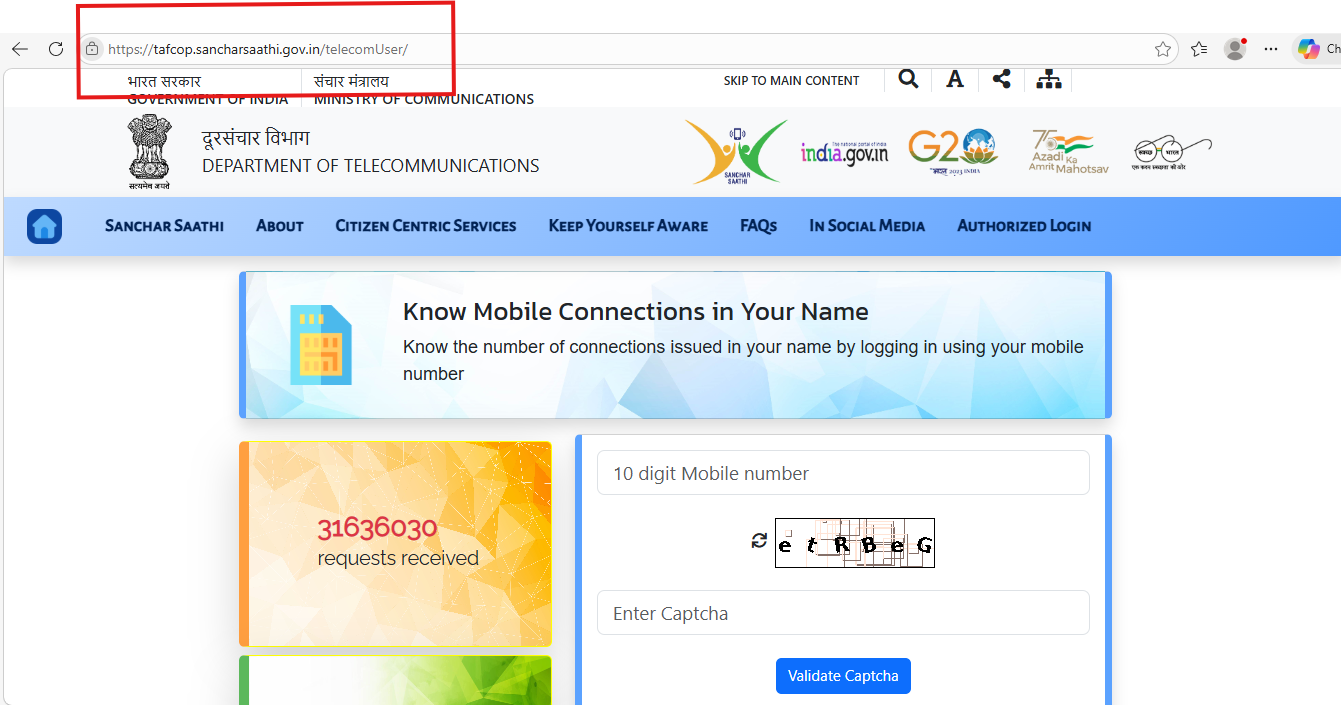
The Department of Telecommunications (DoT) has introduced an official platform called TAFCOP. It stands for Telecom Analytics for Fraud Management and Consumer Protection. This portal allows users to check mobile numbers linked to Aadhaar in a secure way.
Steps to check SIM cards using TAFCOP
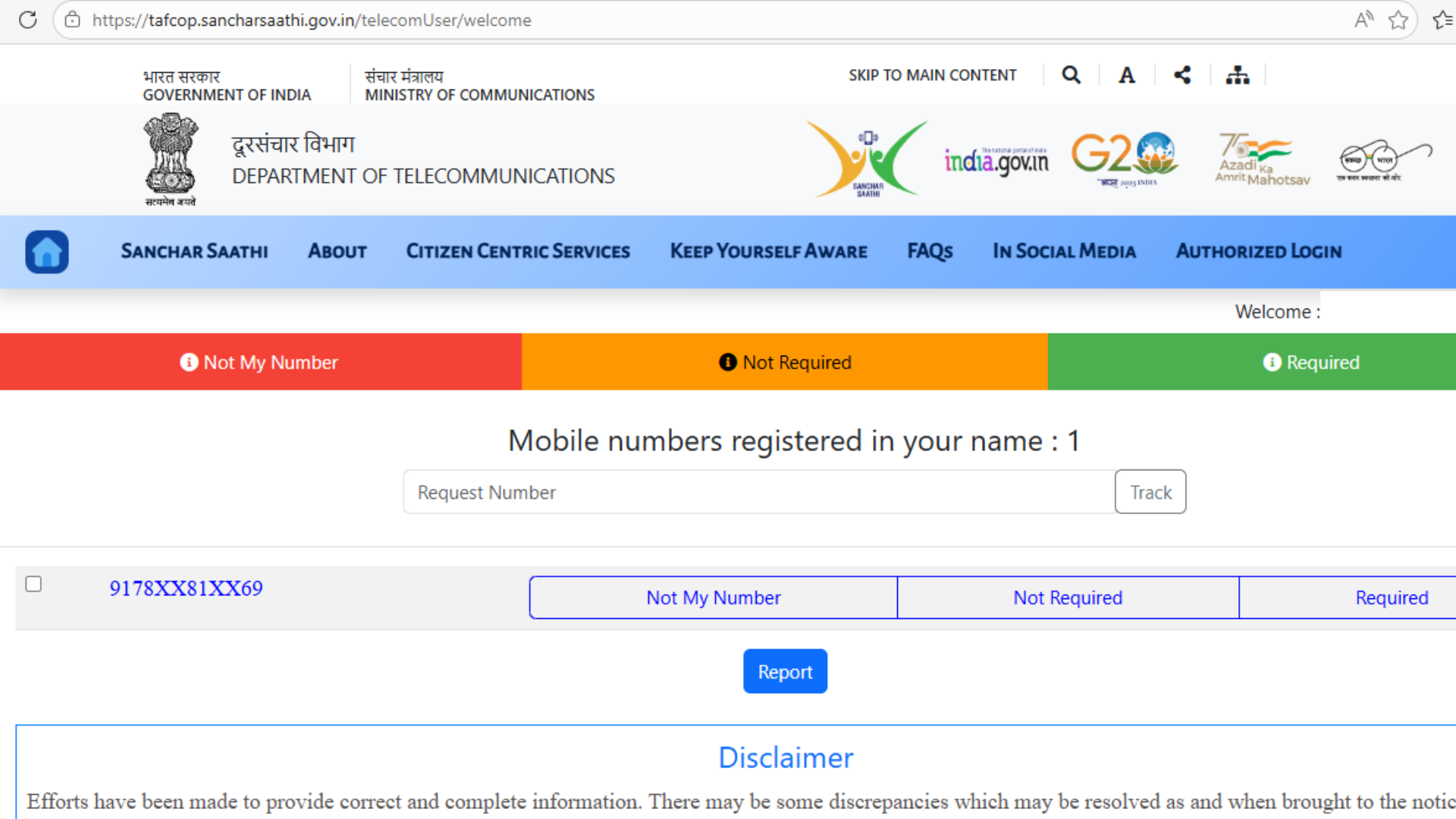
First, visit the official TAFCOP website. Enter your active mobile number and request an OTP. Once you receive and verify the OTP, the system displays all mobile connections issued under your Aadhaar number.
Moreover, the process takes less than five minutes and does not require Aadhaar number entry. This makes it safe and user-friendly.
What details you can see
The portal shows the list of active numbers, telecom operator names, and circle details. For example, you may see numbers from Jio, Airtel, Vi, or BSNL. If you find an unknown number, you can report it directly from the portal.
How to Report or Deactivate Unknown SIM Cards
Reporting a suspicious number online
If you notice a SIM card that you don’t recognize, select the option “This is not my number” on the TAFCOP portal. After submission, the telecom operator reviews the request. As a result, the number may be disconnected after verification.
Visiting the telecom operator store
Sometimes, online requests take time. In such cases, you can visit the nearest store of the telecom company. Carry your Aadhaar card and a valid ID. Explain that you want to remove an unknown SIM linked to Aadhaar.
Timeline for deactivation
Generally, the operator verifies details within a few days. Once confirmed, the unwanted SIM is permanently deactivated. Therefore, acting early reduces risks and keeps your records clean.
Maximum SIM Cards Allowed Per Aadhaar Card
Current telecom rules in India
As per DoT guidelines, one individual can have up to 9 SIM cards across all telecom operators. However, in Jammu & Kashmir, Assam, and the North-East, the limit is 6 SIM cards per Aadhaar card.
Why this limit matters
If your Aadhaar already has the maximum number of connections, you won’t be able to buy a new SIM. For example, if you are switching phones or adding a business number, this limit can create inconvenience.
How to manage SIM limits wisely
Therefore, it’s a good habit to deactivate SIMs you no longer use. In addition, keep track of SIMs issued for family members or devices like tablets and routers.
Common Problems While Checking SIMs on Aadhaar
Not receiving OTP
Sometimes, users don’t receive OTP due to network issues or DND settings. In such cases, try again after some time or use a different active number linked to Aadhaar.
Website not loading or showing errors
The TAFCOP portal may face heavy traffic occasionally. However, this issue usually resolves within a few hours. Using a stable internet connection also helps.
SIMs issued before Aadhaar linking
Some older SIM cards may not appear immediately if Aadhaar was linked later. Therefore, visiting the telecom operator store can help verify such cases manually.
How Often Should You Check SIMs Linked to Aadhaar
Make it a regular habit
Checking once every six months is a good practice. This ensures no unauthorized SIM is active under your name.
After losing documents or phone
If you lose your phone or Aadhaar copy, check linked SIMs immediately. As a result, you can prevent misuse at an early stage.
Before buying a new SIM
Always check your SIM count before applying for a new connection. This saves time and avoids rejection due to exceeding the limit.
FAQs: How to Check How Many SIMs on Aadhaar Card
How can I check how many SIM cards are linked to my Aadhaar online?
You can use the official TAFCOP portal by entering your active mobile number and verifying it with an OTP. The portal will show all SIM cards linked to your Aadhaar safely.
Is it free to check SIM cards linked to Aadhaar?
Yes, the service is completely free. There are no charges for checking or reporting unknown SIMs linked to your Aadhaar card.
Can someone take a SIM card using my Aadhaar without my knowledge?
Although rules are strict, misuse can still happen. Therefore, regular checking helps detect and stop unauthorized SIM cards early.
What should I do if I find an unknown number linked to my Aadhaar?
You should report it immediately on the TAFCOP portal or visit the telecom operator’s store for quick deactivation.
How many SIM cards can one Aadhaar card have in India?
An Aadhaar card can have up to 9 SIM cards in most states. In some regions like Assam and J&K, the limit is 6.
Does checking SIMs on Aadhaar require my Aadhaar number?
No, the process only requires OTP verification on your mobile number. Your Aadhaar number is not shared or displayed.
How long does it take to deactivate an unknown SIM?
Usually, it takes a few working days after verification. However, timelines may vary depending on the telecom operator.
Conclusion
Knowing how to check how many SIMs on Aadhaar card is a simple yet powerful way to protect your identity. With the government-approved TAFCOP portal, anyone can verify and manage their mobile connections in minutes. Regular checks help prevent fraud, reduce stress, and keep your digital life secure. If you haven’t checked yet, now is the right time to do it and ensure every SIM linked to your Aadhaar truly belongs to you.